Multi-Agent MTConnect Machine Monitoring Appliance

Shop-Connect

Monitor current and recent data from multiple MTConnect Agents with configurable, Model-Aware dashboards, unattended displays, and Program Replay.

Shop-Connect consumes upstream MTConnect Agent data and does not connect directly to machines

Purchasing path Custom quote

Pricing is scoped to the selected product, deployment, and implementation requirements.

Explore Program Replay
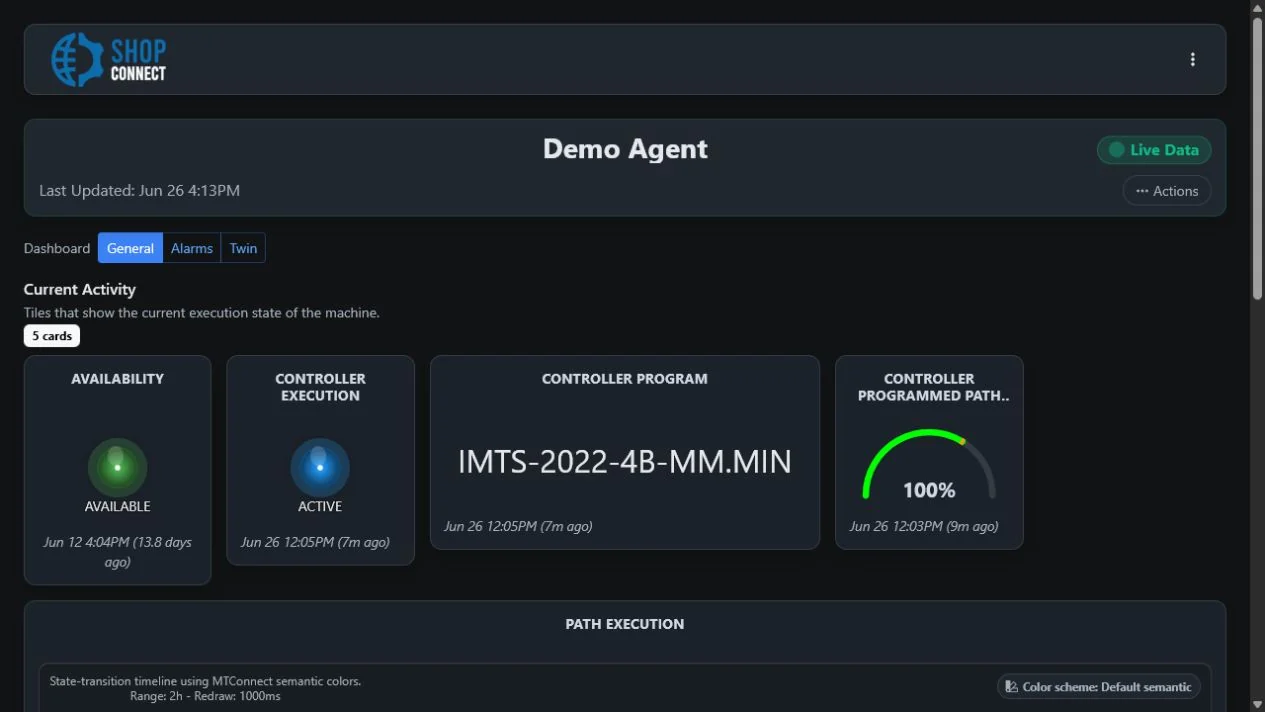
Shop-Connect dedicated Agent dashboard with current availability, execution, program, and path status Open full-size screenshot
A configured Shop-Connect Agent dashboard in the shared Edge-Connect application.

The Integration Journey

Scroll to explore all stages

Monitor existing MTConnect streams across the shop floor and investigate production activity.

Explore Monitor
Best for
Teams that need multi-Agent MTConnect monitoring on attached displays and plant-network browsers
What you need
Separately supplied MTConnect Agent endpoints, network paths, and dashboard requirements
Delivery or workflow
HDMI mini-PC with the Edge-Connect application, configurable runtime-memory buffering, and Program Replay

Overview

What Shop-Connect helps your team do

An HDMI mini-PC monitoring appliance with the Edge-Connect application preinstalled for visualizing data from multiple separately supplied MTConnect Agents.

Monitor current and recent data from multiple MTConnect Agents with configurable, Model-Aware dashboards, unattended displays, and Program Replay.

Common uses

  • Monitor multiple MTConnect Agents
  • Build dashboards for machines and work areas
  • Run unattended plant-floor displays
  • Inspect current and recent MTConnect conditions
  • Replay a selected period of recent Agent data
  • Exchange a selected replay window through a working-prototype MTConnect Exchange Package

How it works

From manufacturing inputs to a usable outcome

Inputs

  • MTConnect streams from separately supplied Agents and integrations
  • Customer-configured Agent connections
  • Dashboard, section, and visualization configuration
  • A selected replay range from runtime memory and history still available from the upstream Agent
  • Imported working-prototype MTConnect Exchange Package files containing a device model and observations
Product components

  • HDMI mini-PC hardware
  • Edge-Connect application preinstalled
  • Configurable runtime-memory buffer
  • Program Replay with working-prototype MTConnect Exchange Package import and export

Outputs

  • Live and recent MTConnect dashboard visualizations
  • Views on the attached HDMI display
  • Views in plant-network browsers
  • Program Replay playback for a selected recent period
  • Working-prototype .mep files containing the MTConnect device model and selected observations

Features / architecture

Capabilities and integration profile

Agent and dashboard configuration

Configure upstream Agents, dashboards, sections, and views.

Model-Aware context

Use standard-derived labels and definitions in configured views.

Dashboard visualizations

Present current and recent observations with configurable visual components.

Unattended display

Cycle through dashboard content on an attached plant-floor display.

Program Replay and exchange

Revisit a selected recent period and move its MTConnect context into an offline replay.

Interfaces
Read-only MTConnect Agent REST API responses from separately supplied Agents; Working-prototype .mep file import and export for Program Replay; HDMI display output; Plant-network browser access
Deployment
On-premises HDMI mini-PC monitoring appliance

Monitor existing MTConnect streams

Shop-Connect begins at separately deployed MTConnect integrations. It is the monitoring layer, not the machine-connectivity layer.

  1. MachinesProduction equipment
  2. Separately deployed Adapters and AgentsProvide MTConnect streams
  3. Shop-ConnectBuffers, organizes, and visualizes Agent data
  4. HDMI display and network browsersPresent configured dashboards

Shop-Connect vs. Edge-Connect

Shop-Connect monitors multiple separately supplied MTConnect Agents; Edge-Connect performs local machine integration with an included Adapter and local Agent. Both use the Edge-Connect application.

Shop-Connect and Edge-Connect product responsibilities and deployment scope
Decision point Shop-Connect Edge-Connect
Purpose Monitor current and recent data from multiple MTConnect Agents with configurable, Model-Aware dashboards, unattended displays, and Program Replay. Connect a machine, local Agent, or cell to MTConnect with the required integration components on the appliance.
Included components HDMI mini-PC hardware; Edge-Connect application preinstalled; Configurable runtime-memory buffer; Program Replay with working-prototype MTConnect Exchange Package import and export Preconfigured edge hardware; Applicable MTConnect Adapter; Local MTConnect Agent; Edge-Connect application
Agent scope One or more separately deployed MTConnect Agents Edge-Connect is normally scoped to the local machine, Agent, or cell running on its hardware
Connectivity responsibility Shop-Connect consumes upstream MTConnect Agent data and does not connect directly to machines Run the applicable Adapter and a local MTConnect Agent on preconfigured edge hardware.
Typical display use Live and recent MTConnect dashboard visualizations; Views on the attached HDMI display; Views in plant-network browsers; Program Replay playback for a selected recent period; Working-prototype .mep files containing the MTConnect device model and selected observations A local MTConnect Agent stream; Local views in the included Edge-Connect application
Shared visualization software Edge-Connect application preinstalled Edge-Connect application

Shop-Connect

Purpose
Monitor current and recent data from multiple MTConnect Agents with configurable, Model-Aware dashboards, unattended displays, and Program Replay.
Included components
HDMI mini-PC hardware; Edge-Connect application preinstalled; Configurable runtime-memory buffer; Program Replay with working-prototype MTConnect Exchange Package import and export
Agent scope
One or more separately deployed MTConnect Agents
Connectivity responsibility
Shop-Connect consumes upstream MTConnect Agent data and does not connect directly to machines
Typical display use
Live and recent MTConnect dashboard visualizations; Views on the attached HDMI display; Views in plant-network browsers; Program Replay playback for a selected recent period; Working-prototype .mep files containing the MTConnect device model and selected observations
Shared visualization software
Edge-Connect application preinstalled

Edge-Connect

Purpose
Connect a machine, local Agent, or cell to MTConnect with the required integration components on the appliance.
Included components
Preconfigured edge hardware; Applicable MTConnect Adapter; Local MTConnect Agent; Edge-Connect application
Agent scope
Edge-Connect is normally scoped to the local machine, Agent, or cell running on its hardware
Connectivity responsibility
Run the applicable Adapter and a local MTConnect Agent on preconfigured edge hardware.
Typical display use
A local MTConnect Agent stream; Local views in the included Edge-Connect application
Shared visualization software
Edge-Connect application

Monitor, investigate, and replay

Move from current machine context into the recent observations that were available when an event occurred.

01 ยท Monitor

See execution state over time

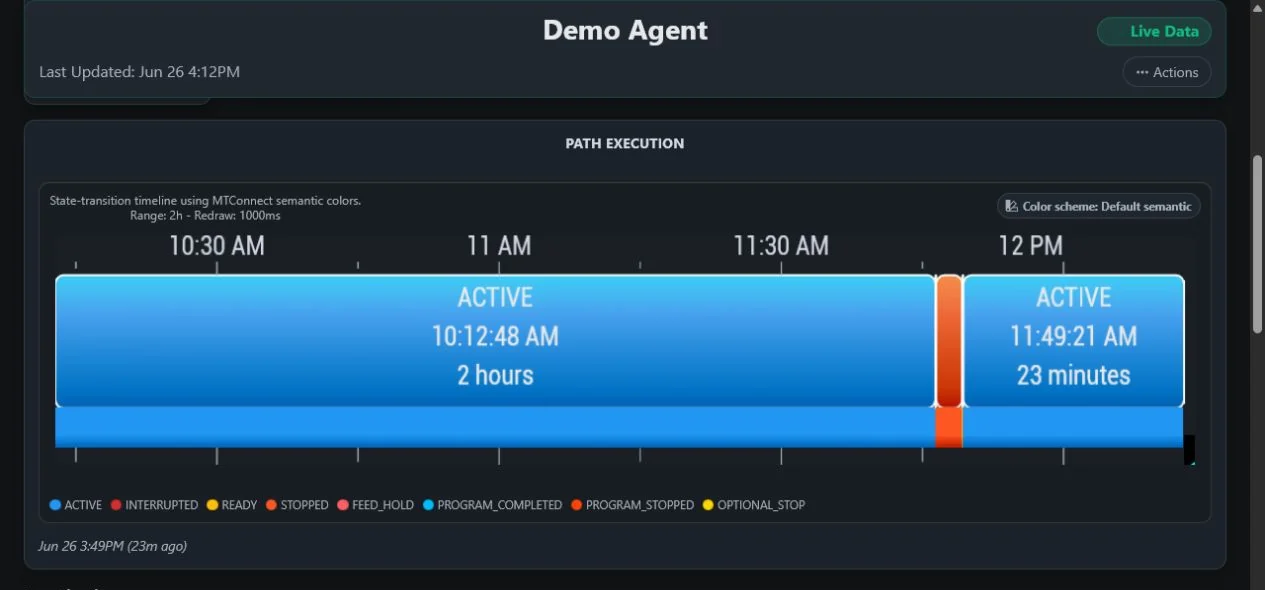
Configured timelines use MTConnect state semantics to show the recent sequence and duration of available execution observations.

Shop-Connect timeline showing active and program-stopped MTConnect execution states over a recent time range Open full-size screenshot
A recent execution-state timeline in the shared Edge-Connect application.

02 ยท Investigate

Review available program context

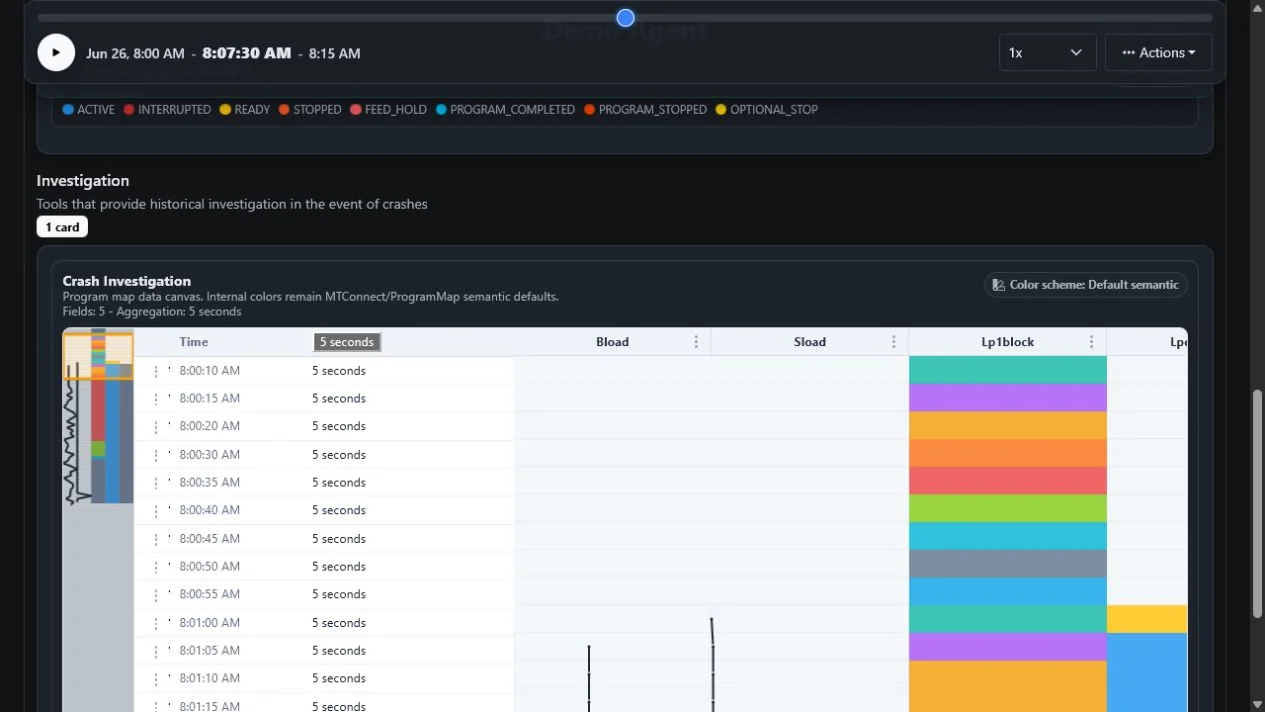
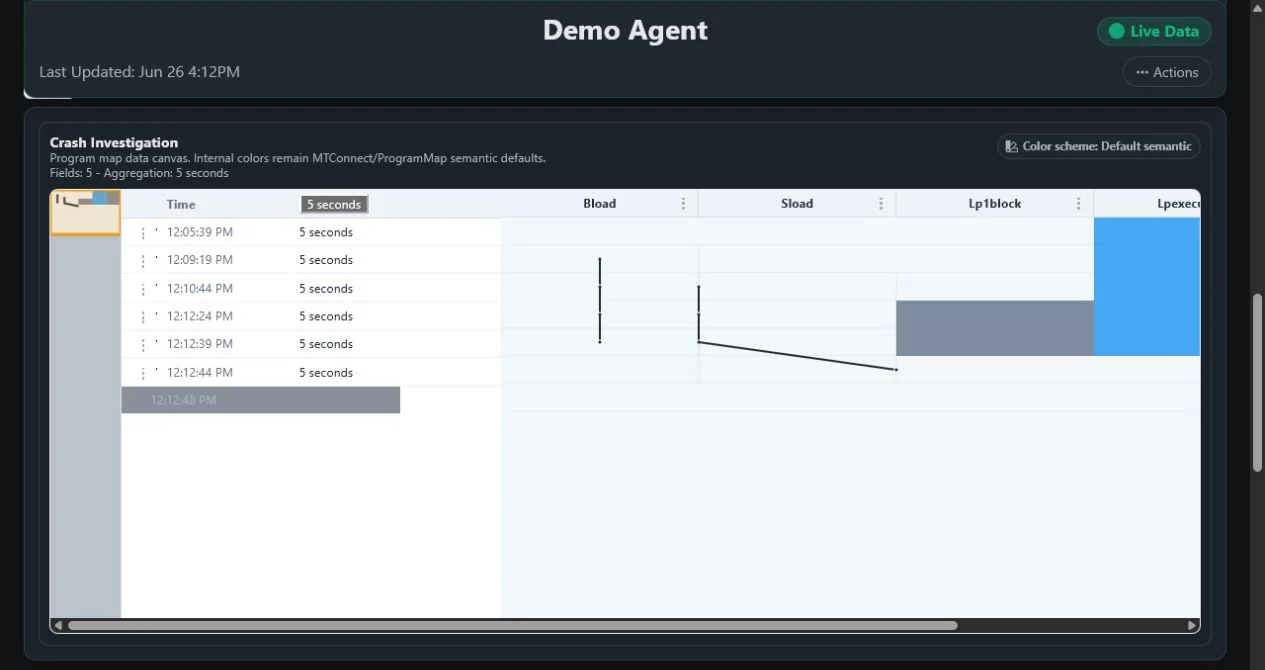
Program maps align selected MTConnect observations over time so a team can examine the context present around an event.

Shop-Connect program map aligning recent timestamps with machine program values for investigation Open full-size screenshot
A configured program-map view for investigating available recent machine observations.

03 ยท Replay and exchange

Program Replay and the MTConnect Exchange Package

Revisit a selected recent period and move its MTConnect context into an offline replay.

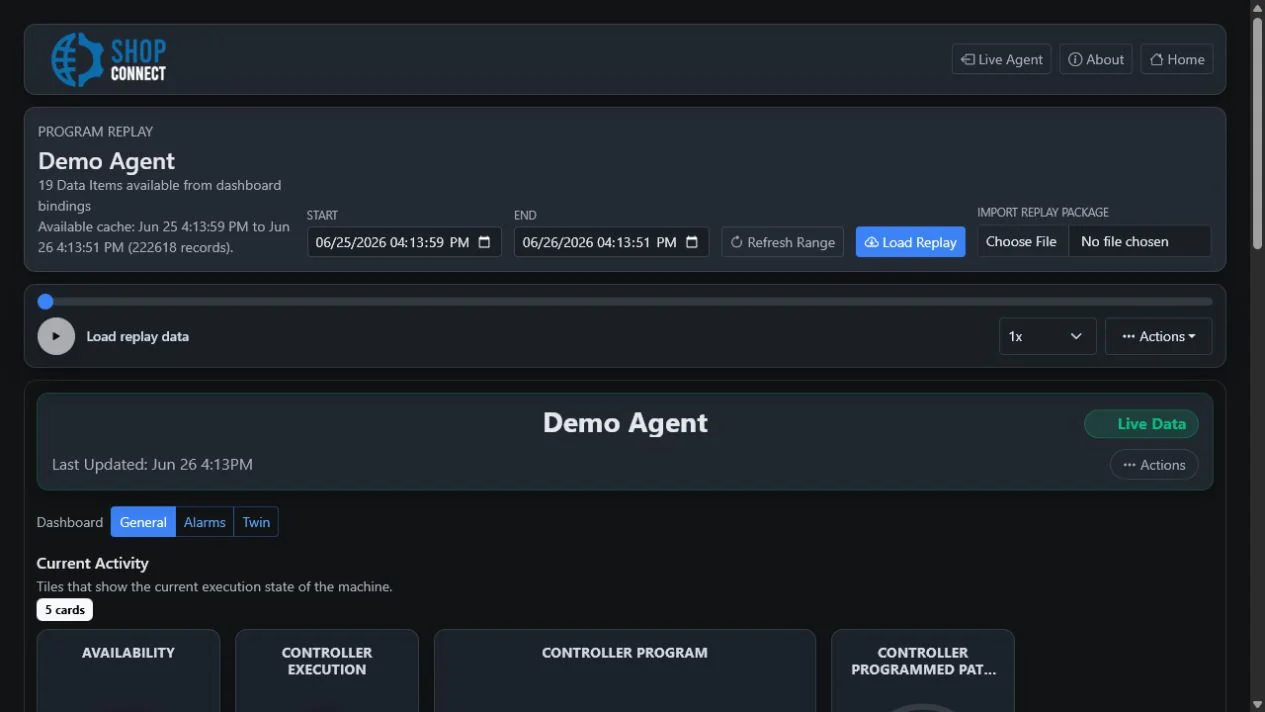
Replay a selected recent period

Select and replay a recent time range assembled from the runtime-memory buffer and additional history still available from the upstream Agent.

Availability boundary: The replayable range depends on runtime memory, upstream Agent retention, connectivity, and the selected interval.

Shop-Connect Program Replay controls for selecting a time range, loading replay data, and importing a replay package Open full-size screenshot
Program Replay controls for selecting a range, loading replay data, and importing a replay package.
  1. Runtime-memory buffer and available Agent historySupply observations still available for the selected interval
  2. Selected replay rangeDefines the period to review or exchange
  3. .mep device model and observationsCreates a portable working-prototype package
  4. Import into Program ReplayLoads the package into Shop-Connect
  5. Offline playbackReplays the captured model and observations without the original live connection
Working prototype

Portable MTConnect replay context

Export the MTConnect device model and selected observations as a .mep file, then import that package into Program Replay for offline playback.

Shop-Connect is the first TAMS product to produce this package.

  • The MTConnect Exchange Package prototype is not currently part of the MTConnect Standard, may change, and does not imply adoption or endorsement by a standards body.
  • No assets, dashboard definitions, or other application configuration are claimed as package contents.

Operational-data handling: Treat exported packages as manufacturing data and control their storage and access through your normal device, network, and file-handling procedures.

Shop-Connect Program Replay at a selected midpoint with program observations displayed in a focused map Open full-size screenshot
A focused program map during active Program Replay playback.
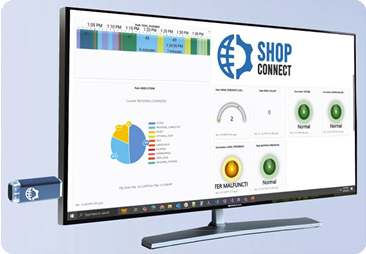
TAMS Shop-Connect product flyer image
Shop-Connect is delivered as an HDMI mini-PC with the Edge-Connect application preinstalled.

On-premises appliance

A focused monitoring deployment

An HDMI mini-PC monitoring appliance with the Edge-Connect application preinstalled for visualizing data from multiple separately supplied MTConnect Agents.

The appliance is configured around the Agent endpoints, network paths, dashboards, and unattended-display requirements selected for the deployment.

Specifications

Specifications, delivery, and operating boundaries

Review technical inputs and outputs, integration details, delivery paths, and qualification facts used to scope the next step.

Specifications

Inputs
MTConnect streams from separately supplied Agents and integrations; Customer-configured Agent connections; Dashboard, section, and visualization configuration; A selected replay range from runtime memory and history still available from the upstream Agent; Imported working-prototype MTConnect Exchange Package files containing a device model and observations
Outputs
Live and recent MTConnect dashboard visualizations; Views on the attached HDMI display; Views in plant-network browsers; Program Replay playback for a selected recent period; Working-prototype .mep files containing the MTConnect device model and selected observations
Components
HDMI mini-PC hardware; Edge-Connect application preinstalled; Configurable runtime-memory buffer; Program Replay with working-prototype MTConnect Exchange Package import and export
Requirements
One or more separately deployed MTConnect Agents; Network paths from Shop-Connect to those Agents; An attached display or a browser with plant-network access

Integration profile

Interfaces
Read-only MTConnect Agent REST API responses from separately supplied Agents; Working-prototype .mep file import and export for Program Replay; HDMI display output; Plant-network browser access
Deployment
On-premises HDMI mini-PC monitoring appliance
Data persistence
Shop-Connect has no database or long-term historian; it uses upstream Agent data plus a configurable runtime-memory buffer.
Security boundary
Network, device, browser or kiosk, operating-system, and physical controls provide access boundaries because Shop-Connect has no built-in accounts or permission levels.
Custom integration
Agent connections, dashboards, visualizations, and replay ranges are configurable; upstream connectivity and additional data remain separate integration responsibilities. The working-prototype Exchange Package moves a selected model-and-observation replay window rather than providing a general-purpose product API.

Delivery Options

Purchasing path Custom quote

Pricing is scoped to the selected product, deployment, and implementation requirements.

Multi-Agent monitoring appliance

HDMI mini-PC hardware with the Edge-Connect application for configurable multi-Agent dashboards.

Includes
  • HDMI mini-PC hardware
  • Edge-Connect application
  • Configurable runtime-memory buffer
You provide
  • Separately supplied MTConnect Agent endpoints
  • Network paths
  • Dashboard and display requirements

Scope factors

  • MTConnect Agent endpoints
  • Network paths
  • Dashboard scope
  • Attached-display and browser use

Capabilities and explicit boundaries

Agent and dashboard configuration

Configure upstream Agents, dashboards, sections, and views.

Included

Configure Agents, dashboards, sections, and visualizations.

Needs: Separately supplied Agent endpoints

Boundary: Shop-Connect does not create machine connectivity.

Included

Connect to Agents manually, through a guided workflow, or with Deployment Manager assistance.

Needs: Network paths to the Agent endpoints

Boundary: Automatic configuration depends on an available configured Deployment Manager registry.

Included

Show Agent connection status and dedicated Agent views.

Needs: Configured Agent connections

Boundary: A Connected state does not guarantee that every visualization has compatible data.

Model-Aware context

Use standard-derived labels and definitions in configured views.

Included

Use Model-Aware titles, template variables, and MTConnect definition tooltips.

Needs: Compatible MTConnect model and observations

Dashboard visualizations

Present current and recent observations with configurable visual components.

Included

Display text and value cards, gauges, orb and icon indicators.

Needs: Configured observations and views

Included

Display line, bar, doughnut, pie, polar-area, radar, time/value scatter, X/Y scatter, timeline heatmap, and program map visualizations.

Needs: Configured observations and views

Boundary: Recent history depends on upstream Agent data and the runtime-memory buffer.

Unattended display

Cycle through dashboard content on an attached plant-floor display.

Included

Use Auto Scroll and per-dashboard Auto Cycle for unattended displays.

Needs: Configured dashboards and display

Program Replay and exchange

Revisit a selected recent period and move its MTConnect context into an offline replay.

Included

Select and replay a recent time range assembled from the runtime-memory buffer and additional history still available from the upstream Agent.

Needs: A configured Agent and data available for the selected interval

Boundary: The replayable range depends on runtime memory, upstream Agent retention, connectivity, and the selected interval.

IncludedWorking prototype

Export the MTConnect device model and selected observations as a .mep file, then import that package into Program Replay for offline playback.

Needs: A selected replay range with an available device model and observations

Boundary: The MTConnect Exchange Package prototype is not currently part of the MTConnect Standard, may change, and does not imply adoption or endorsement by a standards body.; No assets, dashboard definitions, or other application configuration are claimed as package contents.

Additional product limitations

  • Shop-Connect consumes upstream MTConnect Agent data and does not connect directly to machines
  • It has no database or long-term historian; restarts or cache clearing can reduce the recent history available from its configurable runtime-memory buffer
  • Program Replay and Exchange Package availability depends on the current runtime buffer, upstream Agent retention, connectivity, and selected range
  • The working-prototype MTConnect Exchange Package is not currently part of the MTConnect Standard, may change, and includes only the claimed device model and selected observations
  • It visualizes MTConnect conditions and alarms but does not provide native alert delivery, scheduled reporting, OEE, or KPI calculations
  • It has no built-in user accounts, authentication, or permission levels; access must be controlled through network, device, browser or kiosk, operating-system, and physical controls
  • Supported scale is configuration-dependent

Frequently asked questions

Does Shop-Connect connect directly to machines?

No. Shop-Connect consumes data from one or more separately supplied MTConnect Agents and integrations. Machine connectivity must already be provided upstream.

Does Shop-Connect store long-term history?

No. Shop-Connect has no database or long-term historian. It uses upstream Agent data plus a configurable runtime-memory buffer, so restarts or cache clearing can reduce the recent history available.

Does Shop-Connect calculate OEE or KPIs, send alerts, or schedule reports?

No. It visualizes MTConnect data, including conditions and alarms, but does not provide native alert delivery, scheduled reporting, OEE calculations, or KPI calculations.

Does Shop-Connect include user accounts or permissions?

No. It has no built-in user accounts, authentication, or permission levels. Access must be controlled through network, device, browser or kiosk, operating-system, and physical controls.

How many MTConnect Agents can Shop-Connect monitor?

Shop-Connect is designed for multiple Agents, but supported scale is configuration-dependent. Agent behavior, dashboard complexity, retention settings, hardware, and network conditions all affect a deployment.

What is Program Replay?

Program Replay lets a team select and replay a recent period assembled from Shop-Connect runtime memory and additional history still available from the upstream MTConnect Agent. The available range depends on the buffer, Agent retention, connectivity, and selected interval.

What is an MTConnect Exchange Package?

The MTConnect Exchange Package is a working TAMS prototype that stores the MTConnect device model and selected observations in a portable .mep file for import into Shop-Connect Program Replay and offline playback. Shop-Connect is the first TAMS product to produce the package.

Is the .mep format part of the MTConnect Standard?

No. The MTConnect Exchange Package is a working prototype, is not currently part of the MTConnect Standard, may change, and does not imply adoption or endorsement by a standards body.

Next Steps

  • Tailored to your machine connectivity needs
  • Flexible deployment and licensing for your environment
  • Rapid implementation with expert manufacturing support
Manufacturing engineer reviewing dashboard results

Protected Website Forms

HTTPS, antiforgery validation, input limits, and reCAPTCHA protect public form submissions. Review the safeguards.